Caching Next.js Image with KeyDB
2025-01-05

Jonathan Ho
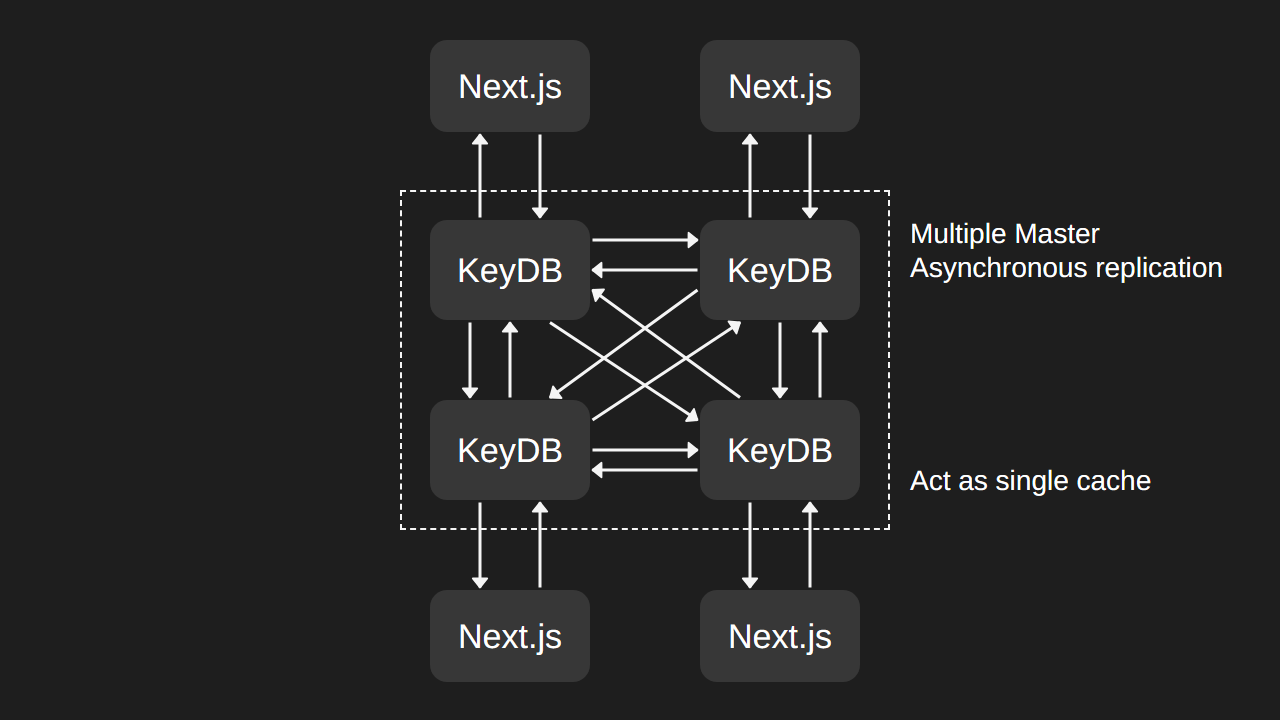
We use Next.js exclusively for our website, on top of that, we use Next.js's Image component to optimize the image. To reduce the size of the image, we use AVIF format, which is a modern image format that is more efficient than JPEG and WebP, but comes with a cost in encoding time: it is much slower to encode an AVIF image than a WebP image. However, we found two issues that are amplified by the AVIF format.
First, every time we push changes to the website (publish a new container image and update the version in Coolify), the Next.js server would lose all its cache, including the cache for optimized images. Therefore, when a user requests the image after an update, the server will need to re-encode or re-optimize all of the images, which takes time. Although we can keep a Docker volume for the cache, it is not ideal because of the second issue.
Second, every server in our fleet would need to encode the image separately, which slows down the image loading and is a waste of resources. This is because the image is optimized at runtime, as opposed to build time where the optimized image can be distributed with the container image. Not only that, the image cache is only stored in each server's own file system, which is not ideal because the cache is not shared between servers. Therefore, if the request is served from a different server, the server would also need to re-render the image, because the rendered image only exists in another server's file system.
A Solution?
When searching for a solution, we found Next.js allows you to set a custom cache handler, which can be used in conjunction with @neshca/cache-handler to use Redis as a shared cache. However, after some digging around, @neshca/cache-handler only supports up to Next.js 14, and we are using Next.js 15, but that is not the main issue. The main issue is that the cache handler is not used to cache the optimized image, but to cache the fetched data and Incremental Static Regeneration page, which is not what we want.
Making our own custom solution
Given there is no solution that fits our needs, we decided to make our own custom solution. First, inspecting the Next.js's code for optimizing image, we located the file that is responsible for optimizing the image, which is server/image-optimizer.js. Based on that, we can have two ways to distribute the optimized image, first is to replicate the folder used to store the optimized image, and second is to store the optimized image directly in Redis.
The first idea is to mount a distributed file system, i.e. GlusterFS, to the folder used to store the optimized image, so that the optimized image is shared between all servers. However, it adds complexity to the infrastructure and it is unstable. Another idea is to asynchronously replicate the folder using Syncthing or another process, again the same issue with GlusterFS, it adds complexity to the infrastructure. At last, we decided to store the optimized image in Redis, which can be set up easily and can be used for other purposes, e.g. ISR cache with @neshca/cache-handler.
Database choice
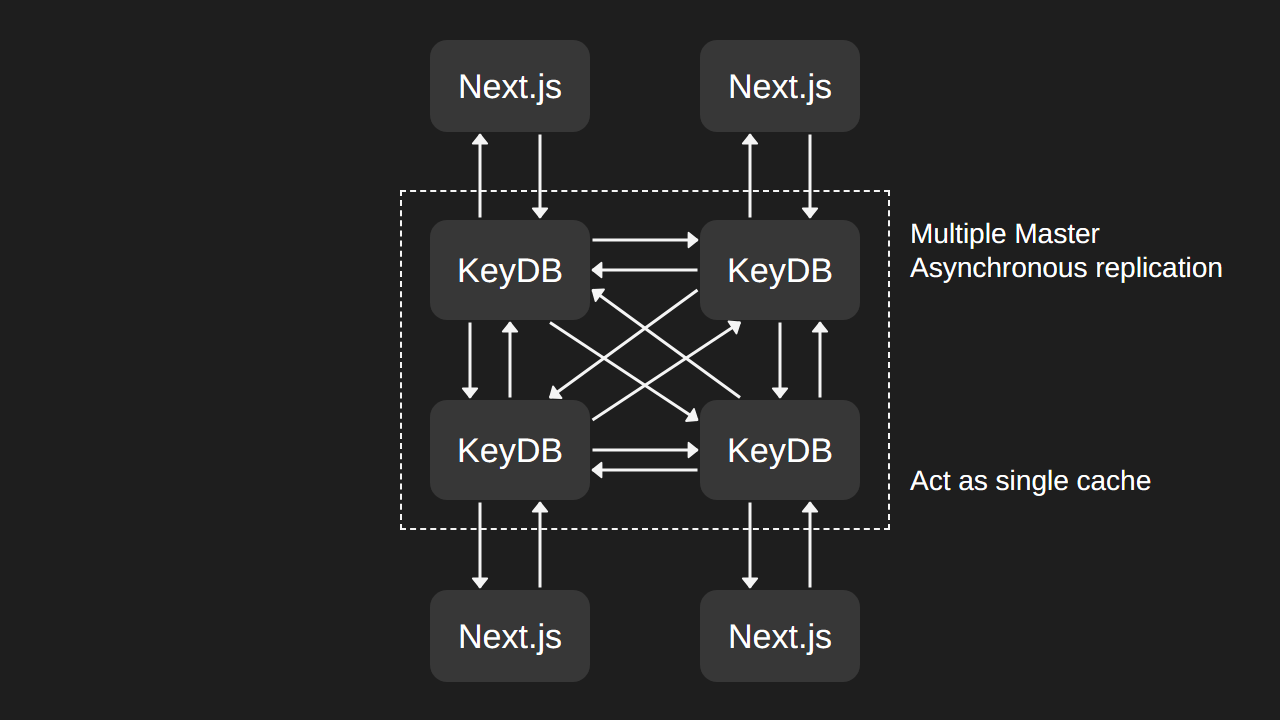
Originally, we planned to use Redis as the cache as it is the most popular in-memory database, with a lot of support and documentation. However, Redis does not support our use case. As a recap, the architecture design of JH0project's infrastructure is uniform and distributed across all servers to maintain high availability, which means that there is no centralized cache server available. Therefore, we need a cache that is distributed across all servers, and every cache can be used for reading and writing. While Redis supports distributed cache via Replication, it uses the master-replica model, where writes need to go through master node (which can be located in another region). This is not ideal because it introduces latency for writing and single point of failure. Then we found KeyDB, which is a fork of Redis that supports multiple masters, which is what we need.
Modifying Next.js
Double checking the code in Next.js, making sure there is no way to implement using existing API, we decided to use yarn patch to do dependency patching at build time. In a nutshell, the patch configures Next.js to store images as base64 string to KeyDB if an environment variable is set, and retrieve the image from Redis if found. A snippet of the code that is responsible for getting the cached image is as follows:
const file = await Promise.race([
    this.redisClient.hgetall(cacheKey),
    new Promise((r) => setTimeout(() => r(undefined), 1000))
]);

// Redis cache timeout or error
if (file === undefined) {
    return null;
}

// Cache miss
if (Object.keys(file).length === 0) return null

const now = Date.now();
const {maxAge: maxAgeSt, expireAt: expireAtSt, etag, upstreamEtag, extension, buffer} = file;
const expireAt = Number(expireAtSt);
const maxAge = Number(maxAgeSt);
return {
    value: {
        kind: _responsecache.CachedRouteKind.IMAGE,
        etag,
        buffer: Buffer.from(buffer, "base64"),
        extension,
        upstreamEtag
    },
    revalidateAfter: Math.max(maxAge, this.nextConfig.images.minimumCacheTTL) * 1000 + Date.now(),
    curRevalidate: maxAge,
    isStale: now > expireAt,
    isFallback: false
};
We added a timeout for getting from the cache, since there's a 7-second limit for the server to respond to an image request, if we wait too long it will respond with a 500 error. This allows it to fall back to fetch upstream and optimize the image.
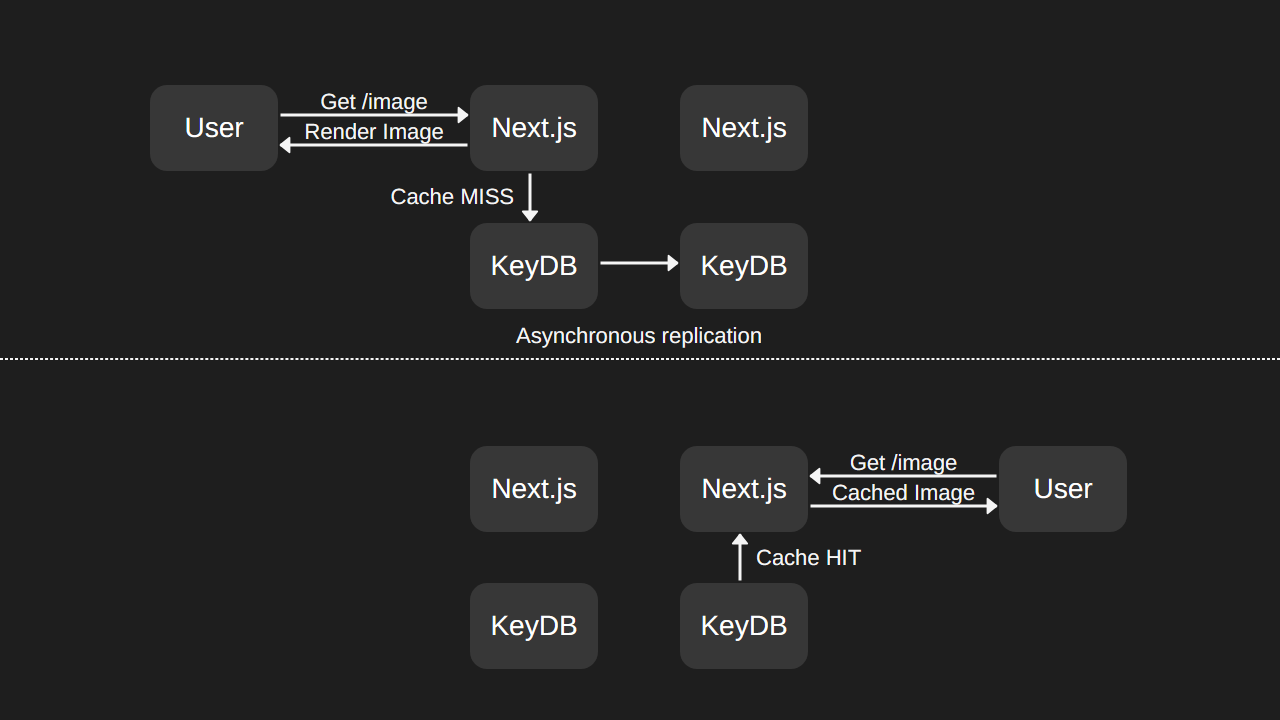
Together, it works like this. When a request for an image is made, the server will check if the image is in the KeyDB, if it is, it will return the image from KeyDB, if not, it will fetch the image from the upstream and optimize it, then store the optimized image in the KeyDB. KeyDB will asynchronously replicate the image to other servers, so that the image is available in all servers. Then when the image request lands on another server, it is able to retrieve the image from the KeyDB and return it to the user without re-optimizing the image.